Grok Bot armies: how people run their life and work with a team of Bots
Some Grok Bot users no longer run one assistant. They run a dozen or more, led by a “chief” Bot, with shared memory and daily routines. Here is how these setups work, what real users have built, and where the hype gets ahead of the facts.
A Grok Bot army is a set of Bots that each do one job, with one chief Bot that hands out the work. Users add routines (jobs that run on a schedule), a shared memory such as a Notion workspace, and one firm rule: nothing goes out without their yes. Public examples on X range from 5 to 24 Bots. All Bots draw from the same weekly usage limit, so a bigger army costs more usage, not more money.
What a Grok Bot army is
Grok Bot lets you create several Bots. Each one has its own role, its own memory and access to a cloud computer. An “army” is what people call a setup where these Bots work as a team: one Bot plans, the others do the work, and you approve what matters.
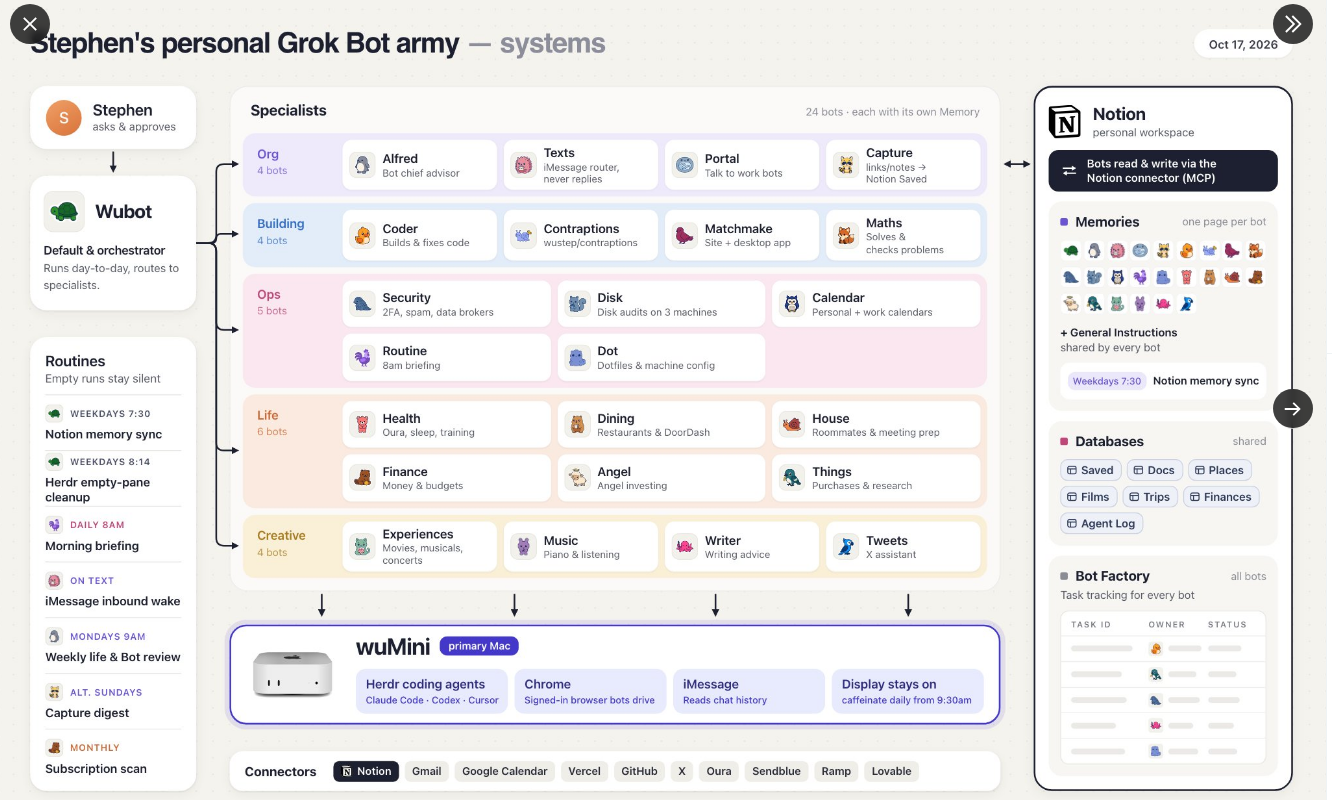
The six parts of a typical army
- A chief Bot. The one you talk to. It splits your request and sends each piece to the right specialist.
- Specialist Bots. One job each: inbox, calendar, travel, money, health, social posts, code. Users group them by area, such as Life, Money or Business.
- Routines. Jobs that run on their own: a morning briefing, a weekly review, a monthly subscription scan.
- Shared memory. Many users connect Notion so every Bot reads and writes the same notes, lists and task board.
- A shared computer. The Bots use a cloud computer with a browser that stays signed in. Some power users add their own always-on machine.
- One rule. Nothing is sent, posted, bought or merged without the owner’s approval. Grok Bot shows approval cards for these actions.
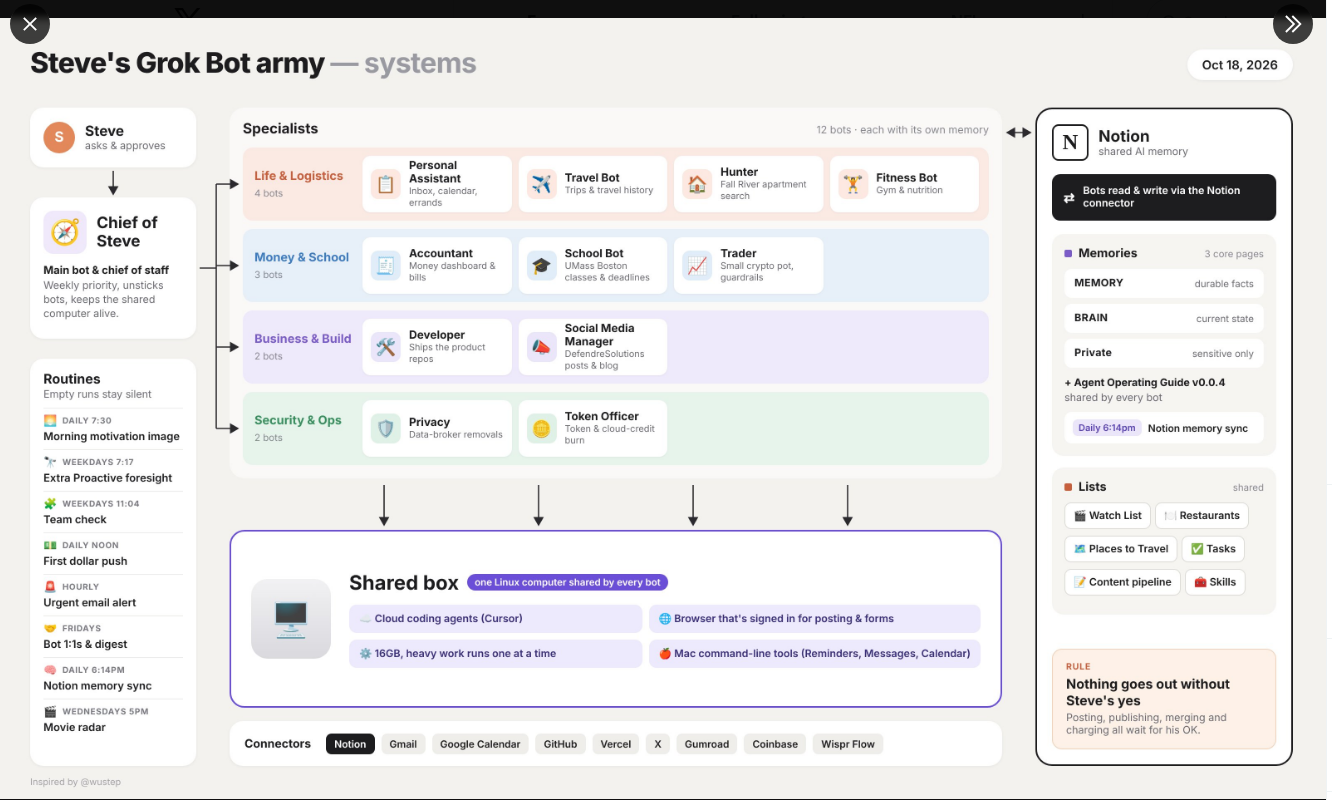
Real armies people shared on X
The one-person company idea
The boldest use of armies is the “one-person company”: one founder, a team of Bots doing leads, outreach, images, replies and weekly numbers.
The official starting point: 56 ready-made roles
We checked the count on SpaceXSI’s use-cases page on October 19, 2026. There are 56 example roles, which work as a menu for building an army:
| Area | Roles | Examples |
|---|---|---|
| Marketing | 13 | Social Media Manager, Newsletter Writer, Competitive Intelligence Analyst |
| Sales | 10 | Sales Outbound, Meeting Prep Buddy, Pipeline Analyst |
| General | 6 | Chief of Staff, Inbox Manager, Presentation Designer |
| Product | 5 | Feature Request Tracker, Docs Auditor |
| Engineering | 5 | Prototype Builder, Cloud Agent Orchestrator, Bug Reproduction |
| Operations and finance | 5 | Expense Manager, Invoice Coordinator |
| Customer success and support | 4 | Ticket Triage Specialist, Account Health |
| Recruiting and people | 4 | Hiring Screener, Onboarding Manager |
| Life | 4 | Apartment Scout, Personal Site Builder, Subscription Cleaner, Travel Coordinator |
The marketplace also has user-made templates, including one called Alfred that designs and audits a whole Grok Bot setup and makes no changes without your approval. See the templates list.
How to build your first small army
- Create a chief Bot. Tell Grok Bot what you want help with and ask for a chief Bot that sends work to others.
- Add one specialist. An inbox Bot is the easiest win. Connect your email and let it draft, never send.
- Give it a routine. A short morning briefing at a time you choose.
- Add shared memory. Connect Notion (or a doc) so your Bots keep the same notes and lists.
- Grow slowly. Add a Bot only when a job repeats every week. Group chats hold 2 to 6 Bots, which is a good size for one team.
- Keep approvals on. Leave “ask first” on for sending, buying, posting and deleting.
New to all this? Start with Grok for beginners, then how Grok Bot works.
Limits and risks
- Usage: every Bot draws from one weekly pool shared with Grok Build, Cursor and the Grok apps. Many Bots on frequent routines can use it up early. See Grok Bot pricing.
- Logins: Bots sign in to your tools once and reuse those logins. Give each Bot only the apps it needs, and never paste passwords or card photos into a chat.
- Mistakes multiply: when Bots pass work to each other, one wrong fact can travel. Read what reaches you before you approve it.
- Money: purchases go through approval cards; see Grok Bot payments.
- Hype: armies make striking screenshots. Most of the value comes from two or three Bots that do boring jobs well.
Questions people ask
How many Bots can I have in Grok Bot?
We found no published limit on the number of Bots. Public setups range from 5 to 24. The real limit is your weekly usage pool. Group chats hold 2 to 6 Bots.
Do I need to code to build a Grok Bot army?
No. You create Bots by describing them in chat, and the chief Bot can create other Bots for you. Coding only matters if you want engineering roles.
Why do people use Notion with Grok Bot?
Through the Notion connector, every Bot can read and write the same pages, so they share memory, lists and a task board instead of each keeping its own notes.
Can a Grok Bot army run a business on its own?
It can do much of the routine work, such as research, drafts, outreach lists and reports. You still approve spending and outgoing messages, and you remain responsible for the business.
- Grok Bot use cases, SpaceXSI (56 roles, checked Oct 19, 2026)
- Chat and collaboration, SpaceXSI docs (checked Oct 18, 2026)
- Grok Bot marketplace, SpaceXSI (checked Oct 18, 2026)
- Grok Bot plans, Cursor help (checked Oct 18, 2026)
- Stephen Wu on X (Oct 18, 2026)
- Miles Deutscher, Grok Bot: The Ultimate Guide, X article (Aug 18, 2026)
- distort, Grok Bot: How to Build Your First AI Team, X article (Oct 10, 2026)